Chapter 1
The Lock-In Problem: Why Multi-Model Architecture Matters
Chapter Summary
This foundational chapter opens with the real-world business and engineering consequences of AI vendor lock-in, tracing how a team's pragmatic choice of a single provider gradually becomes an architectural constraint that limits cost optimization, resilience, and model experimentation. It defines the target reader—from solo builders moving beyond prototypes to enterprise architects designing gateway patterns—and sets clear expectations about what this book will and will not cover. The chapter introduces LiteLLM as the practical framework for building a multi-model AI gateway, walks through the first "Hello World" API call, and lays out the roadmap for the chapters ahead, framing the journey as one from SDK experimentation to production-grade AI infrastructure.
An engineering team usually does not set out to build vendor lock-in. It starts with a deadline. One provider works, one SDK is easy to install, and one model is good enough to ship the first feature. Six months later, the same team has production traffic, rising token spend, a roadmap full of AI features, and a growing list of uncomfortable questions: What happens when the provider is rate-limited? How hard would it be to test a cheaper model? Who owns API keys? Which team is spending the most? Can compliance review what is being logged?
That moment is the reason for this book. LiteLLM matters because it gives teams a practical way to standardize model access while they build the operational habits that production AI requires: routing, fallbacks, budgets, observability, security, and governance.
Who This Book Is For
This book is for builders who already understand why LLMs are useful and now need to make them operationally sane. That includes solo builders moving beyond prototypes, AI engineers integrating multiple providers, software architects designing gateway patterns, DevOps and MLOps teams responsible for reliability, and enterprise AI teams that need cost controls and access governance.
Who This Book Is Not For
This is not a prompt-engineering cookbook, a survey of every model on the market, or a beginner introduction to Python. It also does not promise that every model can replace every other model with no behavioral differences. LiteLLM can standardize the interface; you still need to evaluate prompts, tool calls, context windows, latency, safety behavior, and pricing for your workload.
The Promise
By the end, you should understand how to design, deploy, observe, and govern a multi-model AI gateway. LiteLLM is the central tool, but the larger story is model optionality: keeping your architecture flexible enough to survive provider outages, control cost, meet compliance requirements, and adopt better models without rewriting every application.
The Practical Scenario
Imagine a support automation product that begins with one OpenAI integration. The team ships quickly. Then a rate-limit event slows responses during a customer launch. Finance asks why simple classification tasks are using the most expensive model. Security asks why provider keys are present in three services. Product wants to test another model for long-form reasoning. Suddenly, the problem is no longer "How do we call an LLM?" It is "How do we operate AI as shared infrastructure?"
The architecture below captures the shift: from every application carrying provider-specific complexity to a gateway model where applications use a common interface and the platform owns routing, governance, and observability. As illustrated in Figure 1a and 1b below.
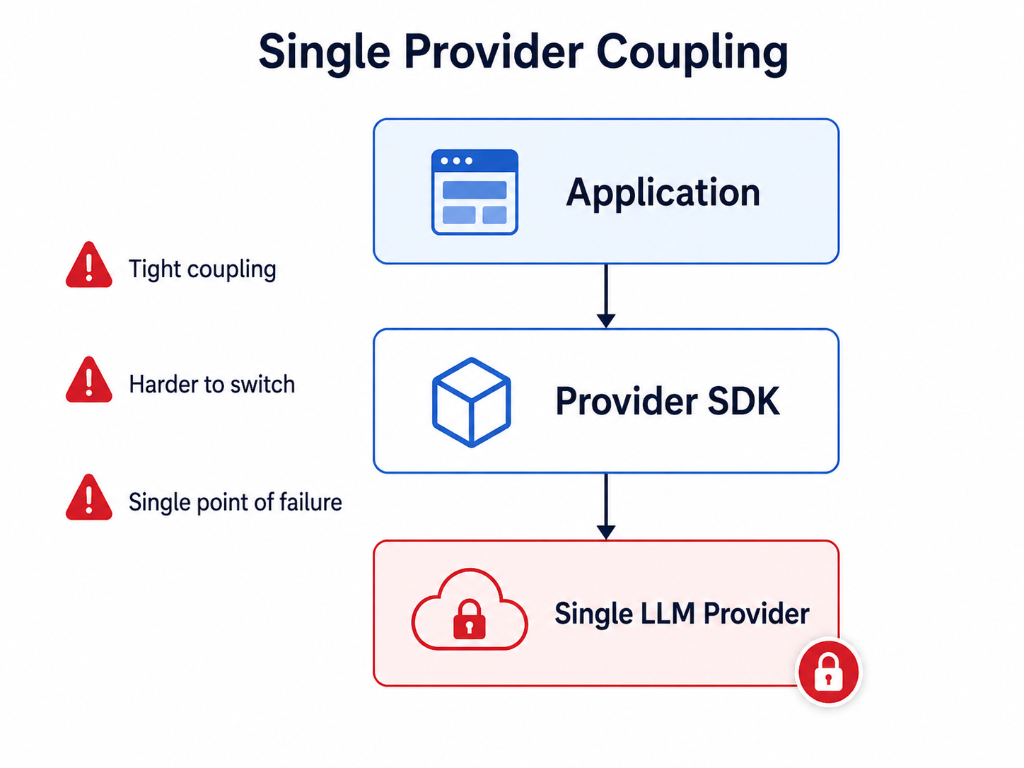
Figure 1a: Single-provider coupling — tight integration, harder to switch, single point of failure.
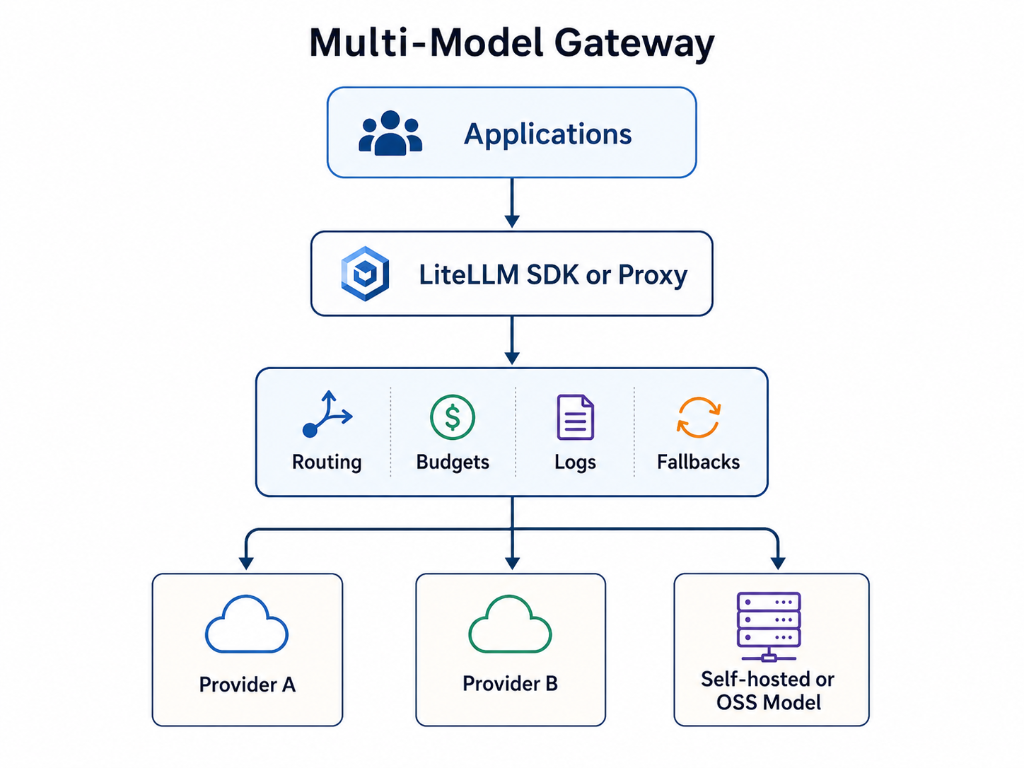
Figure 1b: Multi-model gateway — applications use a common interface while the platform owns routing, budgets, logs, and fallbacks.
1.1 The API Fragmentation Problem
The lock-in problem starts as ordinary engineering convenience. A team picks one provider, one SDK, one authentication pattern, one streaming format, and one response parser. That is a reasonable way to ship a first version. The trouble begins when the integration becomes the boundary of the product.
As soon as the team wants to compare providers, route simple work to cheaper models, add a fallback for rate limits, or centralize compliance controls, the provider-specific decisions spread through the codebase. The application no longer has an AI layer; it has a collection of direct provider dependencies.
The OpenAI chat-completions shape became a common reference point for many developers and tools. LiteLLM uses that familiarity to reduce API fragmentation by accepting a common request pattern and translating it to the selected provider. That does not make every model interchangeable. It gives the engineering team one place to manage the differences.
The practical benefits are concrete:
- Less duplicated provider-specific request and response code.
- Faster evaluation of new models and providers.
- A cleaner path from prototype SDK calls to a proxy-based gateway.
- Centralized routing, logging, budgeting, and fallback decisions.
- A better separation between product logic and provider operations.
1.2 LiteLLM as the Model Access Layer
At its core, LiteLLM is a robust, highly performant abstraction layer. It acts as a universal adapter, accepting requests in the OpenAI API format and transparently converting them into the native API calls of any supported LLM provider. The reverse translation occurs for responses, presenting them back to the caller in the consistent OpenAI format. This architectural choice is deliberate and powerful.
Core Differentiator: Solving Vendor Lock-in and Enabling Model Optionality
LiteLLM's most profound impact lies in its ability to dismantle vendor lock-in and unlock true model optionality. By decoupling application logic from specific provider APIs, LiteLLM can turn many backend changes into configuration and validation work instead of a broad application rewrite.
Imagine a scenario where your application initially uses openai/gpt-4. With LiteLLM, switching to anthropic/claude-3-sonnet or vertex_ai/gemini-1.5-pro involves merely modifying the model parameter in your request or a LiteLLM configuration, not restructuring your code. This flexibility is paramount in an industry characterized by rapid innovation and fluctuating pricing models. Companies can:
- Optimize Costs: Dynamically switch to the most cost-effective model for a given task, without operational disruption.
- Enhance Performance: Easily A/B test different models to find the one best suited for specific use cases, improving accuracy and user experience.
- Improve Resilience: Implement graceful fallback mechanisms, routing requests to alternative providers if a primary API experiences an outage, providing session continuity. For example, the Responses API Load Balancing feature in LiteLLM ensures continuity by routing requests with a
previous_response_idto the original deployment, or load-balancing otherwise. - Accelerate Innovation: Developers can freely experiment with cutting-edge models as soon as they become available, without the overhead of bespoke integration.
LiteLLM achieves this by providing a consistent interface for:
- Chat Completions: The primary mode of interaction with LLMs.
- Embeddings: Generating vector representations of text.
- Image Generation: Interacting with models like Amazon Nova Canvas.
- Speech-to-Text (STT): Transcribing audio, such as with Deepgram models.
- Tool Calling / Function Calling: Seamlessly integrating external tools.
- Structured Outputs / JSON Mode: Ensuring predictable output formats.
- Streaming Responses: Handling real-time token generation efficiently.
This translation capability makes model optionality operational, provided teams still test task quality, latency, output format, tool behavior, and cost.
1.3 Prerequisites for Using LiteLLM
To effectively engage with this book and leverage LiteLLM, readers should possess a foundational understanding of:
- Python Programming: LiteLLM is primarily a Python library. Familiarity with Python syntax, data structures, and object-oriented programming is essential.
- Basic API Concepts: Understanding HTTP requests/responses, JSON data format, and API keys for authentication.
- Large Language Models (LLMs): A conceptual grasp of what LLMs are, how they function, and common use cases (e.g., chat, text generation, summarization).
- Command Line Interface (CLI): Comfort with executing commands in a terminal.
- Docker (Optional but Recommended): For those interested in deploying the LiteLLM Proxy, basic Docker knowledge will be beneficial.
While not strictly required, prior exposure to the OpenAI API or similar LLM APIs will provide a clearer context for the fragmentation problem LiteLLM addresses.
1.4 Quick Start: Your First LiteLLM API Call
Enough theory. Let's get your hands dirty with LiteLLM. This quick start will guide you through installing the LiteLLM library and executing your very first 'Hello World' API call, mirroring the simplicity of the OpenAI format.
Prerequisites:
- Python installed (version 3.8 or higher recommended).
- An API key for at least one LLM provider (e.g., OpenAI, Anthropic, or even a local Ollama instance). For this example, we'll use an OpenAI API key.
Step 1: Install LiteLLM
For local SDK experimentation, install LiteLLM:
pip install litellm
If you plan to run the proxy from the same environment, include the proxy extra:
pip install "litellm[proxy]"
For production, pin and test the version in your own release process rather than copying a version number from a book.
Step 2: Set your API Key
LiteLLM intelligently picks up API keys from environment variables. For this example, we'll set the OpenAI API key.
# On Linux/macOS
export OPENAI_API_KEY="sk-YOUR_OPENAI_API_KEY"

# On Windows (Command Prompt)
set OPENAI_API_KEY="sk-YOUR_OPENAI_API_KEY"

# On Windows (PowerShell)
$env:OPENAI_API_KEY="sk-YOUR_OPENAI_API_KEY"
Replace "sk-YOUR_OPENAI_API_KEY" with your actual OpenAI API key.
Step 3: Write and Execute Your First 'Hello World'
Create a Python file, for example, hello_litellm.py, and add the following code:
from litellm import completion
import os
from litellm import exceptions

# LiteLLM automatically picks up API keys from environment variables (OPENAI_API_KEY, ANTHROPIC_API_KEY, etc.)
# Ensure os.environ["OPENAI_API_KEY"] is set as per Step 2.

try:
    response = completion(
        model="openai/gpt-4o",
        messages=[
            {"role": "user", "content": "Hello LiteLLM, tell me a quick fact about computing history."}
        ]
    )

    print("LiteLLM Response:")
    print(response.choices[0].message.content)

except exceptions.BudgetExceededError as e:
    print(f"A budget error occurred: {e}")
except exceptions.AuthenticationError as e:
    print(f"An authentication error occurred: {e}")
except exceptions.APIError as e:
    print(f"A general API error occurred: {e}")
except exceptions.LiteLLMException as e:
    print(f"A LiteLLM specific error occurred: {e}")
except Exception as e:
    print(f"An unexpected error occurred: {e}")
    # LiteLLM provides consistent exception mapping for easier error handling across providers.
    # For more details, refer to exception mapping in later chapters.
Now, run this Python script:
python hello_litellm.py
You should see an output similar to this (the exact fact will vary):
LiteLLM Response:
Ada Lovelace wrote an early algorithm for Charles Babbage's Analytical Engine.
That small example is enough to prove the boundary: your application can call a stable interface while the provider-specific work stays behind the LiteLLM layer.
Production Takeaways
- Treat model optionality as an architecture decision, not a library preference.
- Start with the LiteLLM SDK when you are proving out prompts, models, and basic flows.
- Move toward a gateway pattern once multiple apps, teams, providers, budgets, or compliance requirements appear.
- Do not promise effortless model switching. Prompts, tool calling, context windows, latency, pricing, and safety behavior still need testing.
- Keep provider keys out of application code as soon as the work moves beyond a prototype.